Case Study
Backdraft AI
From a folder-watching script to a bidirectional code-design editor
Case Study
From a folder-watching script to a bidirectional code-design editor
The Origin
Backdraft didn't start as a product. It started as a personal tool I used to evaluate AI models.
I had a script on my desktop that watched a folder for screenshots. I'd drop in mockups or screenshots of websites I liked, and the script would run a full pipeline: extract a design system from the image, then generate a complete sample landing page in HTML and CSS. When a new model came out, I'd swap it into the workflow and let the whole thing run end-to-end. The output told me everything I needed to know about a model's design capabilities in a single pass — its visual taste, its structural reasoning, its ability to translate a flat image into working code.
I ran variations of this workflow for over two years. What started as a model evaluation tool evolved into something more powerful: a design system extraction process that could accurately capture not just colors and fonts, but the full structural composition of a page. The spacing patterns, the component hierarchy, the aesthetic feel down to a granular level that let me recreate websites with high accuracy using much smaller models, typically in one shot. Most people were throwing entire screenshots at GPT-4 and getting mediocre outputs. I was getting production-quality results from open source models because the design system did the heavy lifting.
Having that concrete design system in hand changed everything about how I worked with AI. The model didn't have to guess at the design language. It had explicit tokens to work from. That meant it could design consistently over time without drifting from the original aesthetic. It could extrapolate and create entirely new components — navigation bars, feature grids, pricing tables — that felt like they belonged with the originals, because they were built from the same underlying system.
Before this workflow existed, my process was the standard one that most designer-developers know. Create a mockup in 2D — Adobe XD, Figma, sometimes just a sketch — and then manually convert that into code. With the design system extraction, I could skip the manual translation entirely. Feed the LLM a mockup and the extracted design tokens, and the code came out right the first time.
The moment I decided to turn this into a real product was when I started seeing other people and teams building tools that did pieces of what I was already doing. Bolt, v0, Lovable — they were all approaching the same problem from different angles. It wasn't that I didn't think a full bidirectional editor was possible. I just didn't think I could build it. But I realized I'd been solving the hardest part of the problem — consistent, high-quality design-to-code translation — for two years already. The tool just needed a proper interface around it.
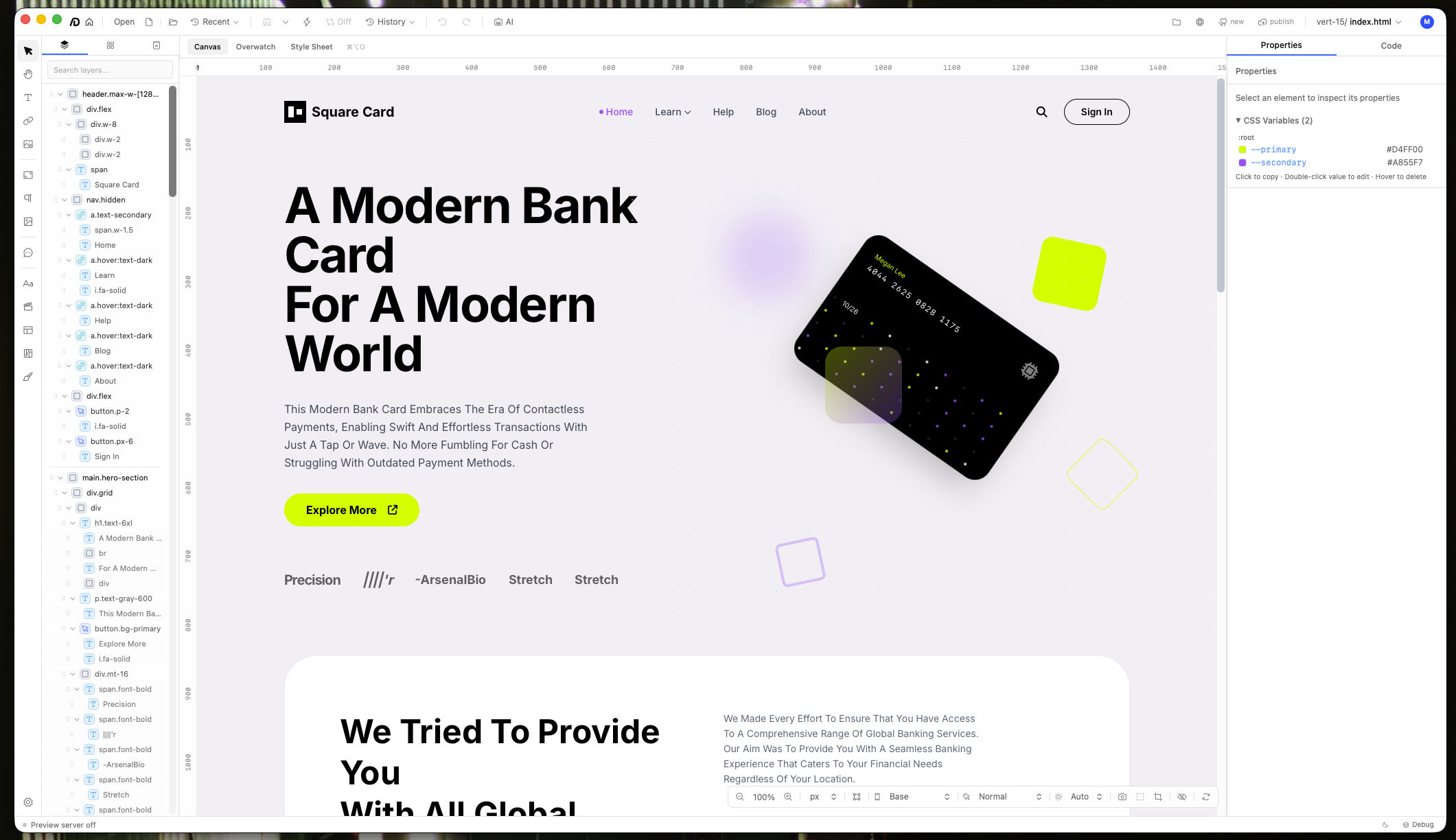
The editor canvas with a live project loaded. The layer tree on the left mirrors the DOM structure, the center canvas renders the page visually, and the code panel on the right shows the source. Edits in any panel sync to the others in real time.
Technical Decisions
I chose React because I wanted the tool available to anyone regardless of their operating system. I only hold an Apple developer account, and publishing a native Windows app would cost significantly more. Since these are side projects and cost-effectiveness matters, React was the obvious choice. It let me host the app on the web so anyone with a browser could use it, and also package it as a desktop app for both macOS and Windows through Tauri.
Tauri v2 specifically was the right fit because it gave me everything Electron would have, but with a fraction of the bundle size and better system integration. The Rust backend handles the heavy lifting — file system access, native OS integration, and the performance-critical parts of the rendering pipeline. The web frontend handles the visual layer. For a design tool where responsiveness is non-negotiable, that split matters.
The core technical challenge is the bidirectional layer. There's a system that lives between the raw source code and what you see on the canvas. It interprets the code, renders it visually, and lets you interact with the rendered version. When you drag a component, resize an element, or change a color, those edits get converted back to true source code on the other side. Not generated code that replaces your file. Your actual code, with your formatting and naming conventions intact.
This is what makes Backdraft different from tools that generate code from a visual interface. Those tools own the output. Backdraft works with code you already wrote. You can open your existing React project, your HTML/CSS site, your Tailwind app, and edit it visually. The changes write back to the same files you'd open in VS Code.
The hardest part of building this was the adapter system. There are countless ways to write the same thing in code. A centered div could use flexbox, grid, auto margins, absolute positioning, or a dozen other approaches. There's no single canonical way to interpret code outside of rendering it natively. The tool has to read every file, parse every line, understand the relationships between elements, and make rendering decisions that match what a browser would do. Then it has to reverse that process when you make visual changes.
That meant building a wide library of language adapters — each one understanding the syntax, patterns, and idioms of a different technology. HTML/CSS behaves differently from React with Tailwind, which behaves differently from Vue with scoped styles. Every combination needed its own interpretation logic. Getting that library broad enough to handle real-world projects was the single biggest engineering challenge in the entire build.
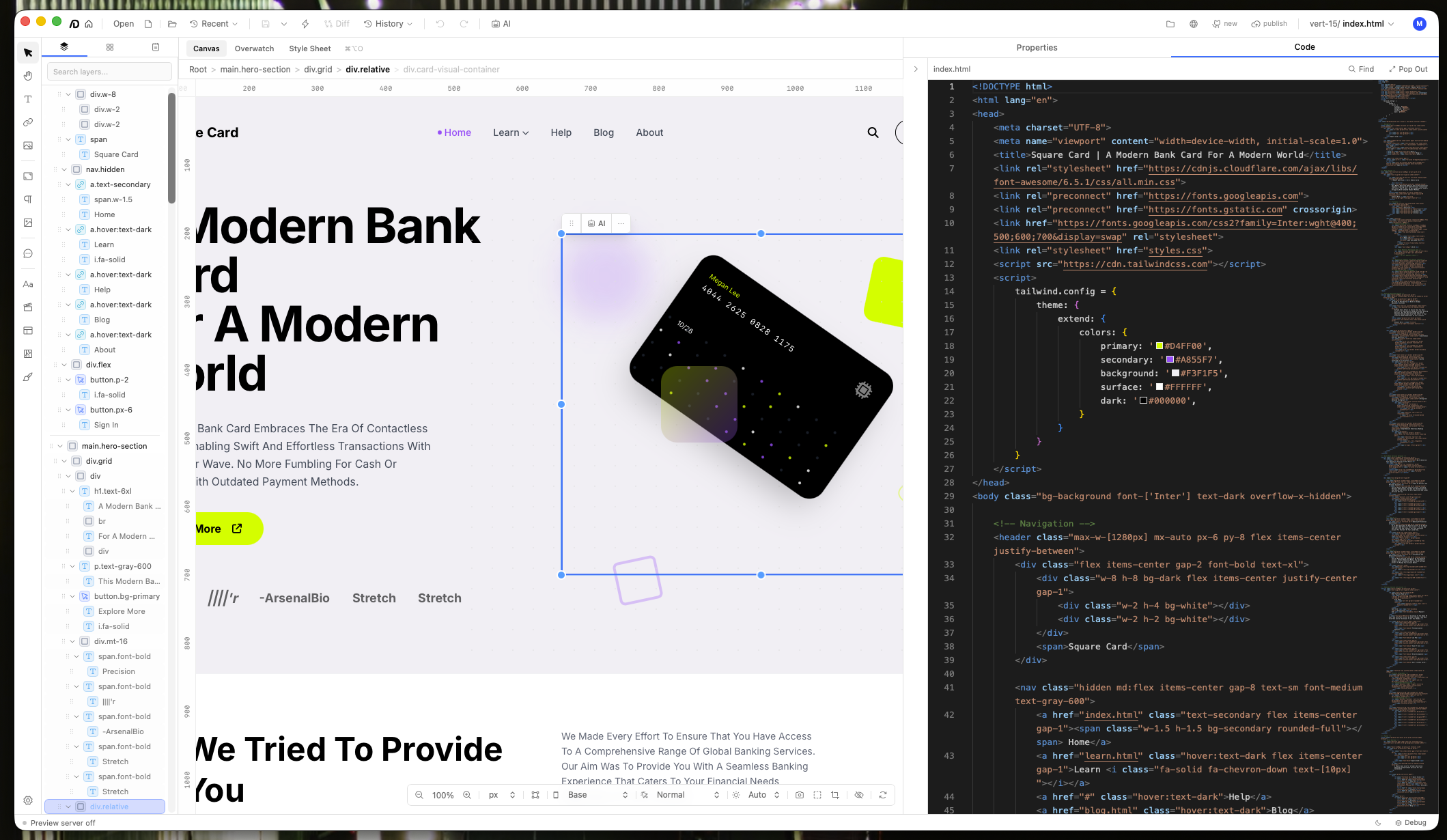
The bidirectional layer in action. Visual changes on the canvas write back to the source code, preserving the developer's formatting and naming conventions. The adapter system interprets each framework's idioms differently.
The AI Agent
The AI agent in Backdraft isn't a chatbot bolted onto an editor. It's a structured workflow that mirrors what a real designer would actually do to build a website from scratch.
The first step is design system extraction — the same process I'd been refining for two years. Feed the agent a screenshot or mockup, and it pulls out color palettes, typography scales, spacing tokens, component patterns, and the overall aesthetic direction. This becomes the foundation that every subsequent generation builds on.
From there, the agent handles practical steps that would normally eat hours of a designer's time. Image sourcing is built in through Unsplash, where the agent searches by keyword and presents results in a selectable grid. Instead of jumping between browser tabs, scrolling through stock photo pages, and downloading individual files, the user picks from a curated preview and the images are placed directly into the project. The agent can also generate placeholder content, scaffold page structures, and create component variations — all constrained by the design system so everything stays visually coherent.
I initially tried to build my own native scaffolding for the agent — a custom framework for managing tool calls, context windows, and multi-step workflows. But there are far more edge cases to handle than I anticipated. The existing CLI tools had already solved those problems. Claude Code handles long-running sessions and complex multi-file edits with remarkable consistency. Codex brings strong reasoning about code structure. Gemini CLI excels at the initial creative generation. Rather than reinvent all of that, I built native integrations so Backdraft can use any of them.
This multi-model approach turned out to be one of the most important architectural decisions. Each model family has distinct strengths that map to different phases of the design workflow.
Gemini models tend to be the best at front-end design. When you ask Gemini to generate a landing page from a design system, the initial output is excellent — creative, visually interesting, well-structured. But in long-running sessions where you're iterating and refining, Gemini can degrade the project. Components that looked polished start losing their coherence. The code gets messier. Quality drifts from good to bad over the course of a session.
Claude Code and Codex with GPT models handle the long game better. They follow directions more consistently over time, produce higher quality edits, and maintain the design system's aesthetic through dozens of iterations. They're less likely to break something they fixed three edits ago.
The result is a workflow where you can use the right model for each phase. Gemini for the initial creative burst, then Anthropic or GPT for sustained editing and long-term project maintenance. The design system acts as the connective tissue, keeping the aesthetic consistent regardless of which model is doing the work at any given moment.
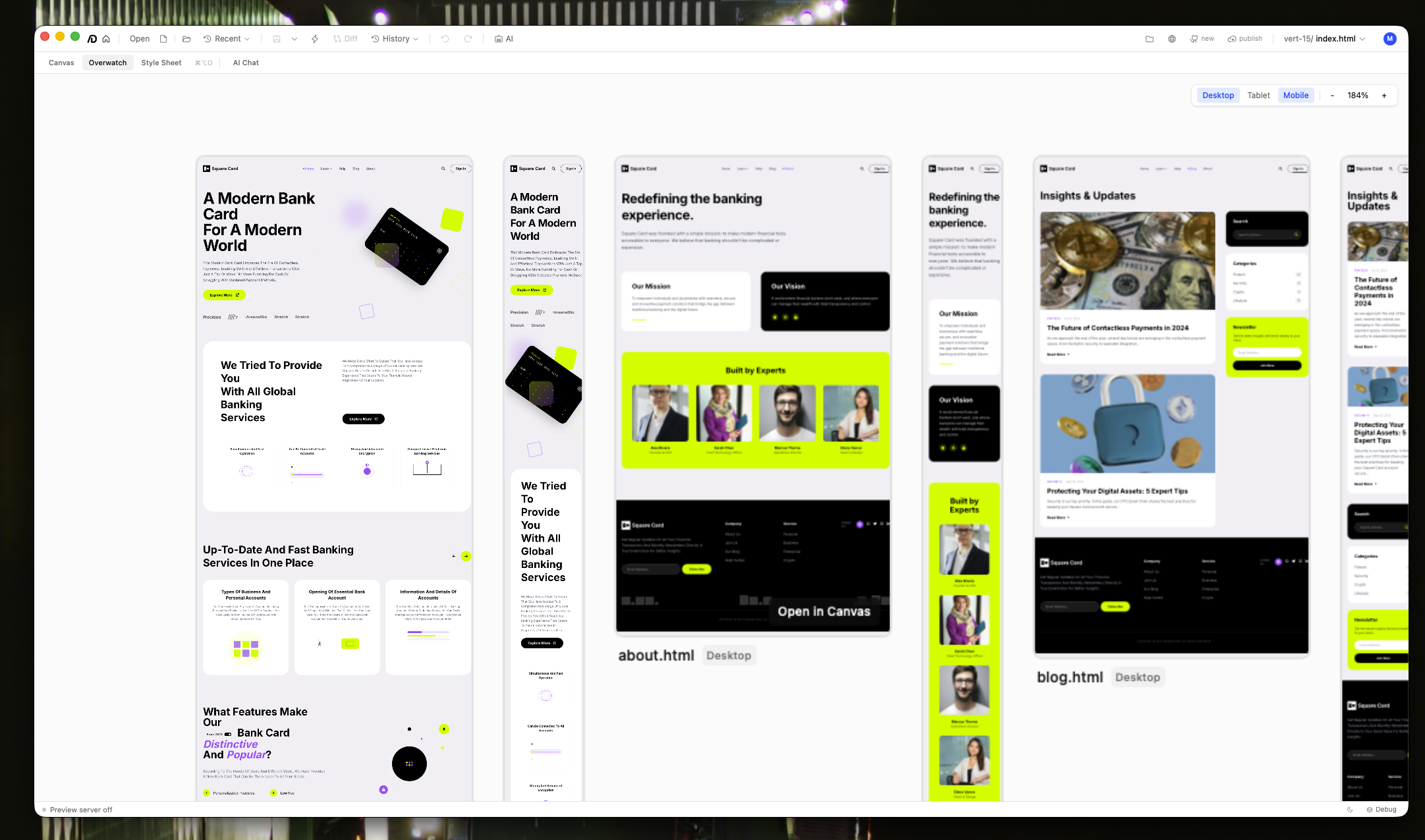
Overwatch mode renders every page in the project simultaneously at desktop, tablet, and mobile breakpoints. This makes it possible to spot responsive issues across the entire site without navigating page by page.
Next Case Study
Fitted AI →