Case Study
Fitted AI Video Series
AI-powered outfit swap animations built frame by frame with a custom Python pipeline
Case Study
AI-powered outfit swap animations built frame by frame with a custom Python pipeline
The Concept
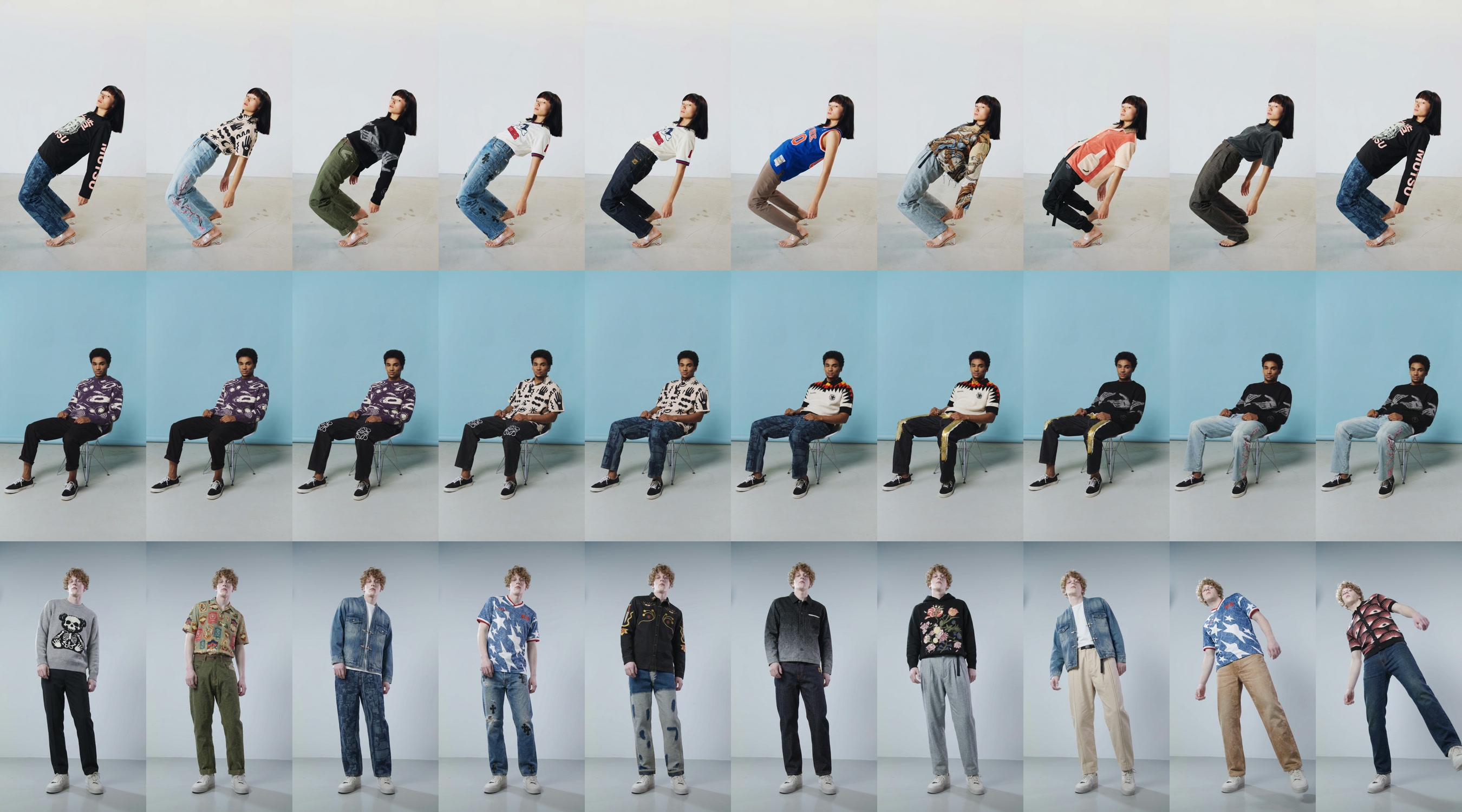
The idea was simple: take a person standing in an outfit, then rapidly swap through dozens of outfit combinations while keeping the person, their pose, and the background perfectly consistent. Each clothing change lands with an audible shutter click. The outfits cycle faster and faster until they snap back to the final look. It's the kind of ad that stops a thumb mid-scroll.
The concept came directly from the Fitted AI app. If the app can generate any outfit on any person, then a video showing that capability in rapid-fire succession is the strongest possible proof. No voiceover needed. No explanation. Just watch it work.
The catch is that this kind of video doesn't exist as a standard workflow. There's no "outfit swap video" tool. Every frame had to be generated individually by an AI model, then reassembled into a video, then composited over the original footage to maintain consistency. The entire pipeline had to be built from scratch.
All three videos in the series. Hover to preview, click to play full screen with audio.
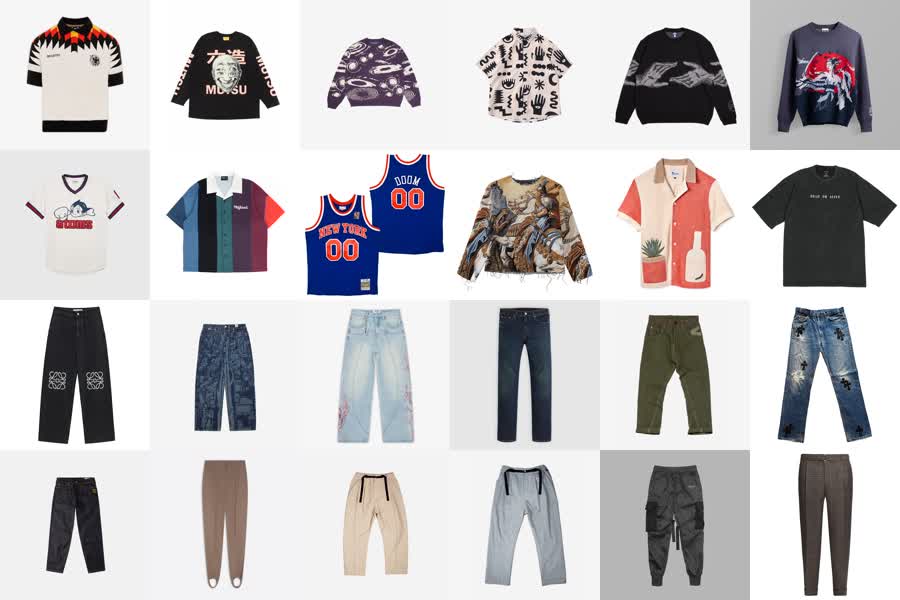
A selection of the tops and bottoms from the digital closet. The pipeline alternates between swapping the top and swapping the bottom, cycling through the curated set to create dozens of unique outfit combinations per video.
The Pipeline
The process started with the original video. I wrote a Python script that split the footage into individual frames, then isolated the middle section where the outfit changes would happen. The opening and closing frames stay untouched so the video has clean bookends.
Each frame in the target range was sent through Google's Nano Banana image generation API. The script swapped one clothing item at a time — the top would hold for six to eight frames, then the bottom would swap and hold for the same duration, then the top again. This alternating pattern is critical. If every item changed on every frame, the result would be an incomprehensible blur. By holding each piece for several frames before switching, the viewer's eye can register each outfit before the next change hits. The generated image was upscaled to match the source resolution, and each completed frame became the input reference for the next, creating smooth transitions rather than random jumps.
The script would run for hours per video. Each run cost between fifteen and thirty-five dollars in API credits depending on how many frames were processed. The success rate sat around 90%. The remaining 10% were failures from intermittent API errors, not problems with the generation itself. The Google image generation API would occasionally timeout or return malformed responses. I couldn't prevent those failures, but I built the script to log every failed frame so I could rerun just the missing ones without reprocessing the entire batch.
Doing this manually would have been impossible. Hundreds of frames per video, three videos, each frame requiring an API call, an upscale, and a quality check. That's over six hundred individual AI generations plus post-processing. The script automated the entire chain: generate, upscale, verify, log, advance to next frame.
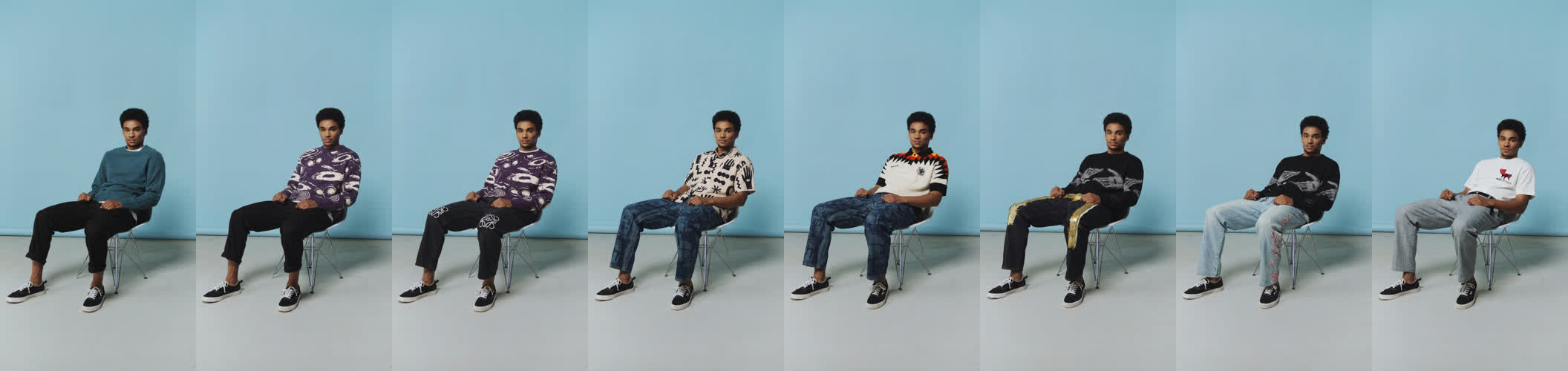
Eight frames sampled every 12th frame across the generated sequence. The original outfit is on the far left. Each subsequent frame shows the pipeline swapping one item at a time — the top holds for several frames, then the bottom swaps, then the top again — creating a perceptible rhythm of change rather than an incomprehensible blur.
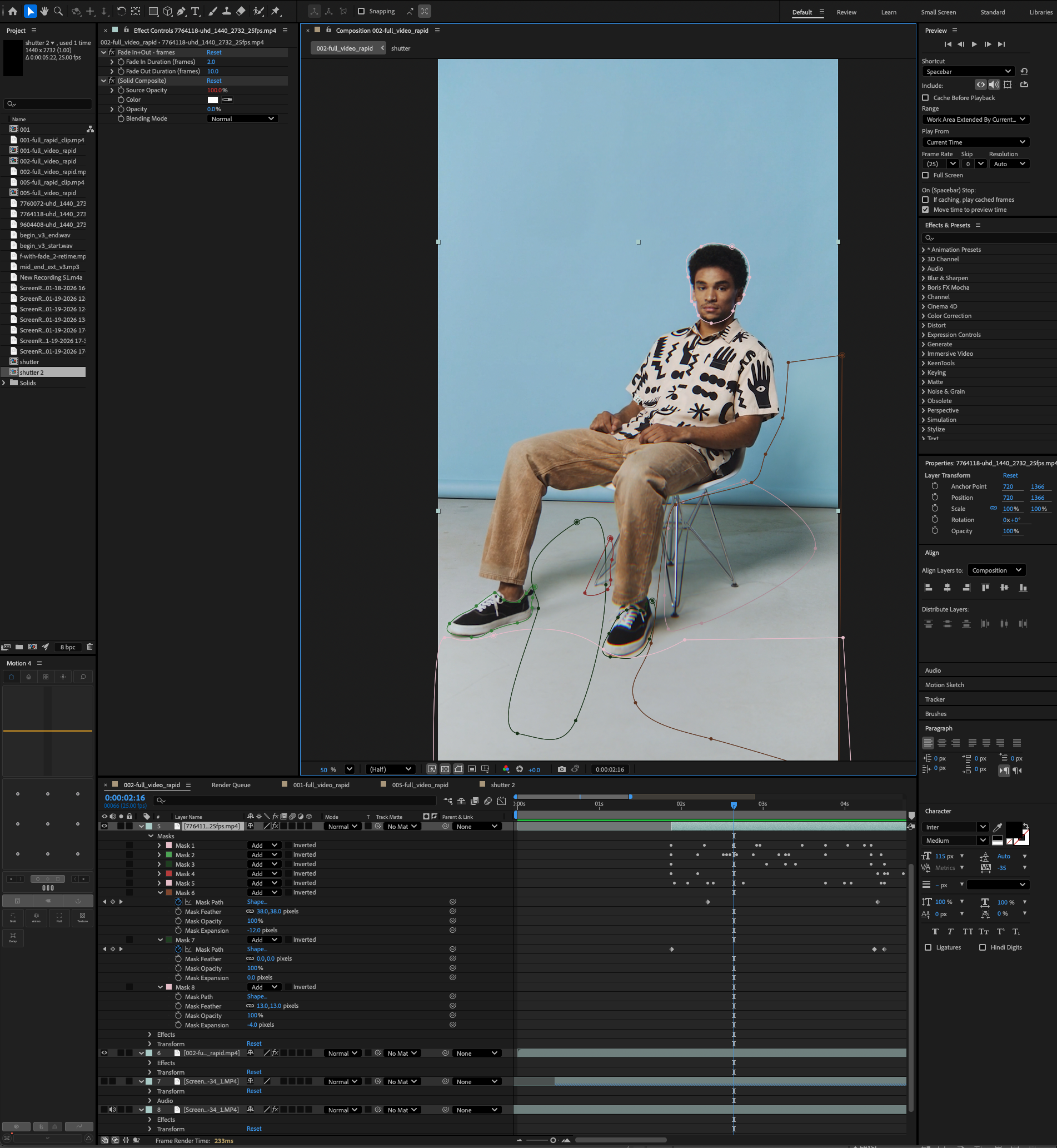
The After Effects composition with eight mask layers isolating face, hair, and background regions. The AI-generated video is overlaid on the original footage, with inverted masks ensuring only the clothing regions show AI output.
Compositing
Raw AI-generated frames have a problem: jitter. Even with frame chaining, the model introduces subtle variations in areas that should stay perfectly still. The face shifts slightly. The hair moves. The background wobbles. In a still image these variations are invisible. In video, played back at 24 or 30 frames per second, they create an unsettling flicker that immediately reads as artificial.
My first approach was to use SAM (Segment Anything Model) to isolate just the clothing regions and only swap those areas. In theory, this would keep the face and background pristine while only replacing the outfit. In practice, the masked regions created hard edges and the AI couldn't generate convincing clothing within the irregular mask boundaries. The outfit looked pasted on. I abandoned that approach and went with full-image swaps instead, letting the model regenerate the entire frame and relying on it to respect the original pose. This produced much more natural-looking results, but it meant the face, hair, and background all had slight AI variations frame to frame.
The solution was compositing in post. I took the AI-generated video and overlaid it on the original footage in After Effects, then built eight mask layers to isolate specific body regions. The face and hair were masked to use the original footage, not the AI output. The background was locked to the original. Only the torso and clothing regions used the AI-generated frames. This selective compositing eliminated the jitter everywhere it mattered while preserving the outfit changes where they needed to happen.
With the masks in place, I added additional processing to sell the final result. Sharpening to counteract the slight softness that AI upscaling introduces. Lens effects to give the footage a consistent camera feel. Film grain and noise to mask any remaining artifacts at the boundaries between masked and unmasked regions. These aren't heavy-handed effects. They're subtle enough that you don't notice them, but they're doing real work to bridge the gap between AI-generated and camera-original footage.
The final assembly happened in Premiere. I composed the audio track with music, timed the shutter click sound effects to land on each outfit change, and added a closing frame with the Fitted AI logo animation. The audio design is a bigger part of the ad's impact than it might seem. The rapid-fire clicking creates a rhythm that sells the speed of the outfit changes and gives the viewer an auditory anchor for what they're seeing.
Next Case Study
Gaussian Design →