Case Study
LM Pocket
A local-first iOS companion app that orchestrates AI models across multiple devices
Case Study
A local-first iOS companion app that orchestrates AI models across multiple devices
The Problem
LM Studio changed the game for running AI models locally. No cloud, no API costs, no data leaving your machine. But it only runs on your desktop. If you're away from your desk, on the couch, in a meeting, or just want to fire off a quick prompt from your phone, you're out of luck.
The first version of LM Pocket solved that. It connected your iPhone to your Mac's LM Studio instance over your local network and let you chat with any loaded model. Streaming responses, model switching, system prompts. A simple client.
But then I started asking a harder question: what if you have more than one computer?
The Architecture
Most people who run local AI have more than one device. A Mac Studio at their desk, a MacBook on the go, maybe a Linux box with a GPU. Each machine can run LM Studio and load different models. But there's no way to use them together.
LM Pocket treats every LM Studio instance as a node in a compute pool. You add connections by hostname and port, assign each one a role — orchestrator or worker — and tag them with capabilities like "coding" or "reasoning" or "fast." The app maintains a live connection to each node, tracks which models are loaded, and monitors performance metrics like tokens per second.
The networking layer uses Tailscale, a mesh VPN built on WireGuard. This is the critical piece. Tailscale creates encrypted point-to-point tunnels between your devices without routing traffic through any server. Your prompts, your responses, your files — none of it touches the internet. You don't need to open ports, configure firewalls, or set up a VPN server. You just install Tailscale on each machine, and LM Pocket connects to them by their Tailscale hostname.
This means you can run LM Pocket from your phone at a coffee shop and it connects to your Mac at home through an encrypted tunnel. The latency is minimal because Tailscale uses direct connections when possible. And the setup is a guided wizard in the app — enter hostname, port, test connection, done.
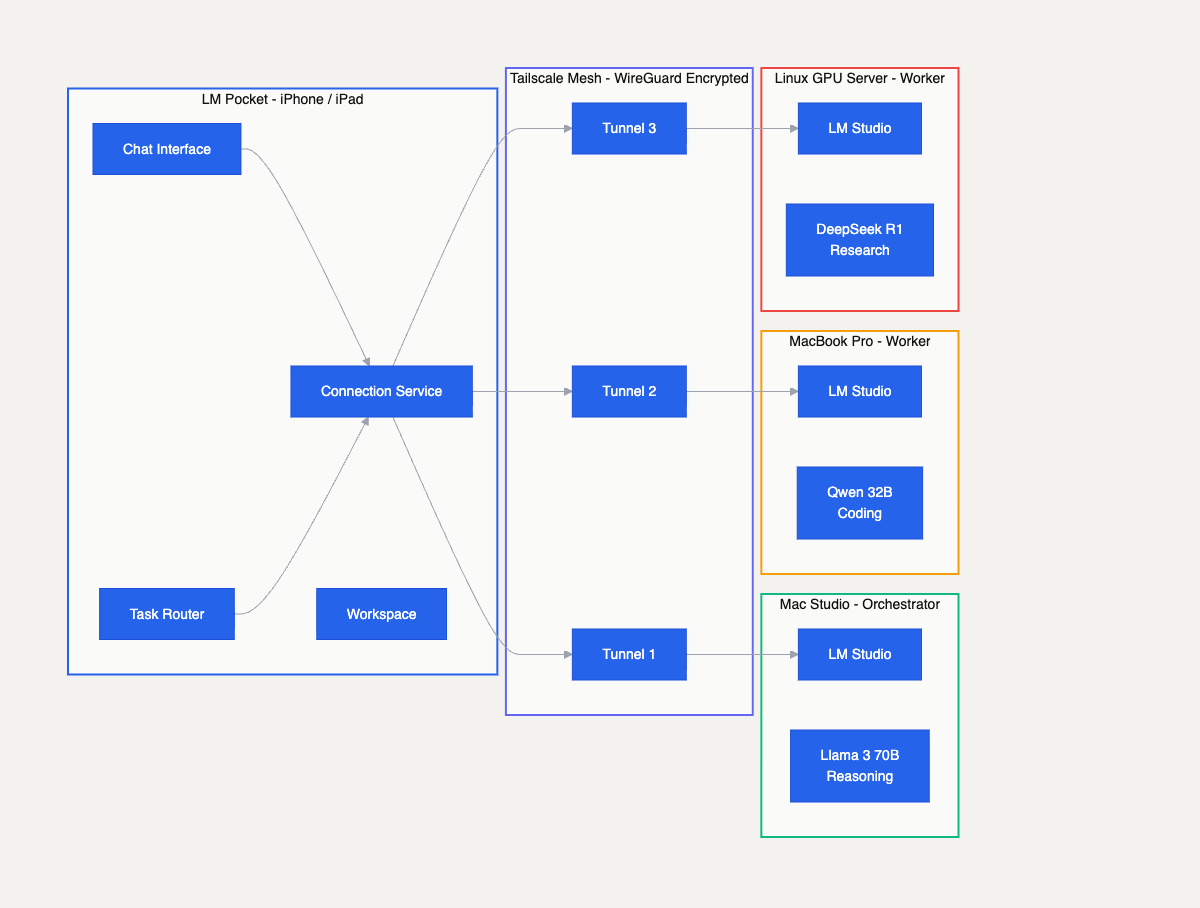
The multi-device architecture. LM Pocket connects to Mac Studio, MacBook Pro, and Linux GPU server through encrypted Tailscale tunnels, each running different models.
Orchestration
The app supports three chat modes. Standard mode is a direct conversation with one model. Agent mode gives a single model access to tools — web search, file operations, clipboard. But the real capability is Orchestrator mode.
In Orchestrator mode, you designate one connection as the orchestrator and the rest as workers. When you send a prompt, the orchestrator model breaks it down into a task manifest — a structured plan with subtasks, dependencies, and preferred worker assignments. The task router then scores each worker against each subtask using weighted multi-factor matching:
Workers execute independently with full tool access. Each produces a structured result — status, files created, issues encountered. The orchestrator validates the results, requests revisions if needed, and synthesizes everything into a final response. The whole lifecycle flows through phases: planning, dispatching, executing, validating, synthesizing, completed.
A single device running a 7B model can handle simple tasks. But if you need a large reasoning model for planning AND a fast coding model for implementation AND a research model for web lookups, you'd normally have to do that sequentially on one machine. With orchestration, all three run in parallel across your devices. The orchestrator coordinates. The total throughput multiplies.
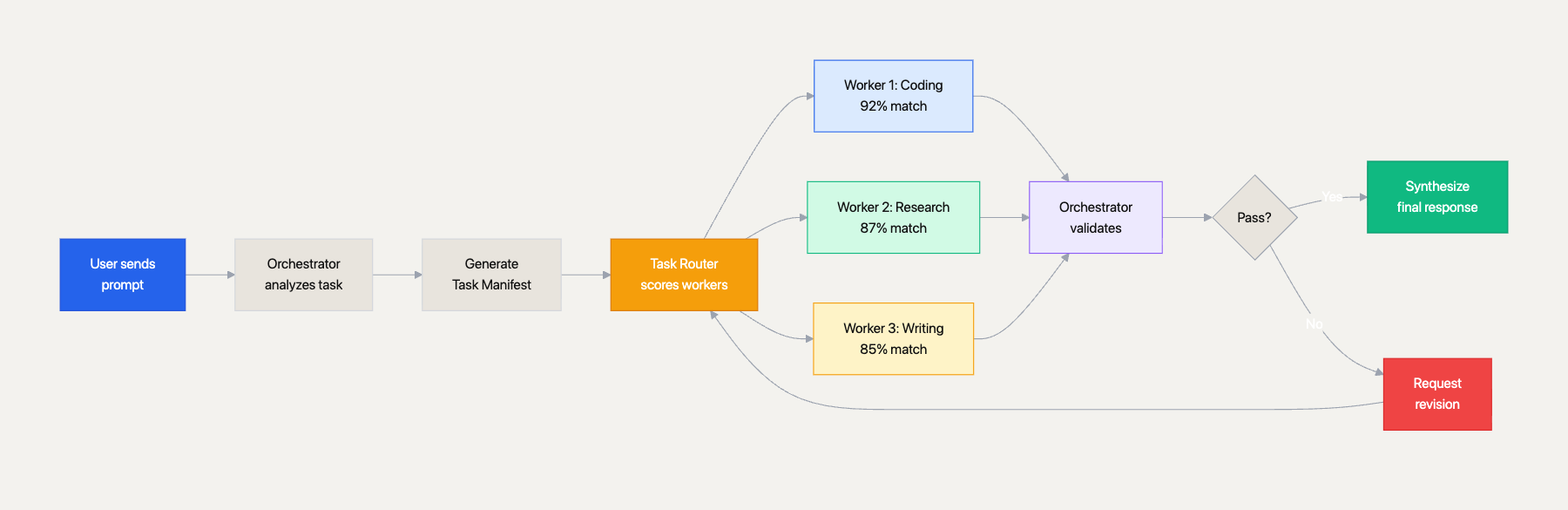
The orchestration lifecycle. User prompt flows through task decomposition, weighted worker scoring, parallel execution, validation, and synthesis.
Workspace
One of the limitations of mobile AI apps is that the LLM can only talk. It can't create anything persistent. LM Pocket changes that with the workspace system.
Every chat session has a virtual filesystem — a sandboxed directory where the LLM can create, read, edit, and manage files. The workspace tool gives the model full CRUD operations: write new files, find-and-replace edits, append content, rename, delete, list, search, diff, and even snapshot and restore for rollback. Files are scoped to the session, stored in SwiftData, and support binary data with automatic language detection from file extensions.
This means the LLM can actually do meaningful work on your phone. Ask it to write a Python script and it creates the file in your workspace. Ask it to build an HTML page and it writes the markup. Ask it to refactor a config file and it reads the current version, makes edits, and saves the result. The workspace persists across sessions, so you can come back to your work later.
The tool system goes deeper than file operations. The app includes a role detection system that analyzes your prompt and automatically assigns the agent a persona — coder, designer, researcher, writer, or validator. Each role gets domain-specific guidance, phase prompts, and drift correction. A drift detector monitors idle workers and injects corrective reminders to keep them on task.
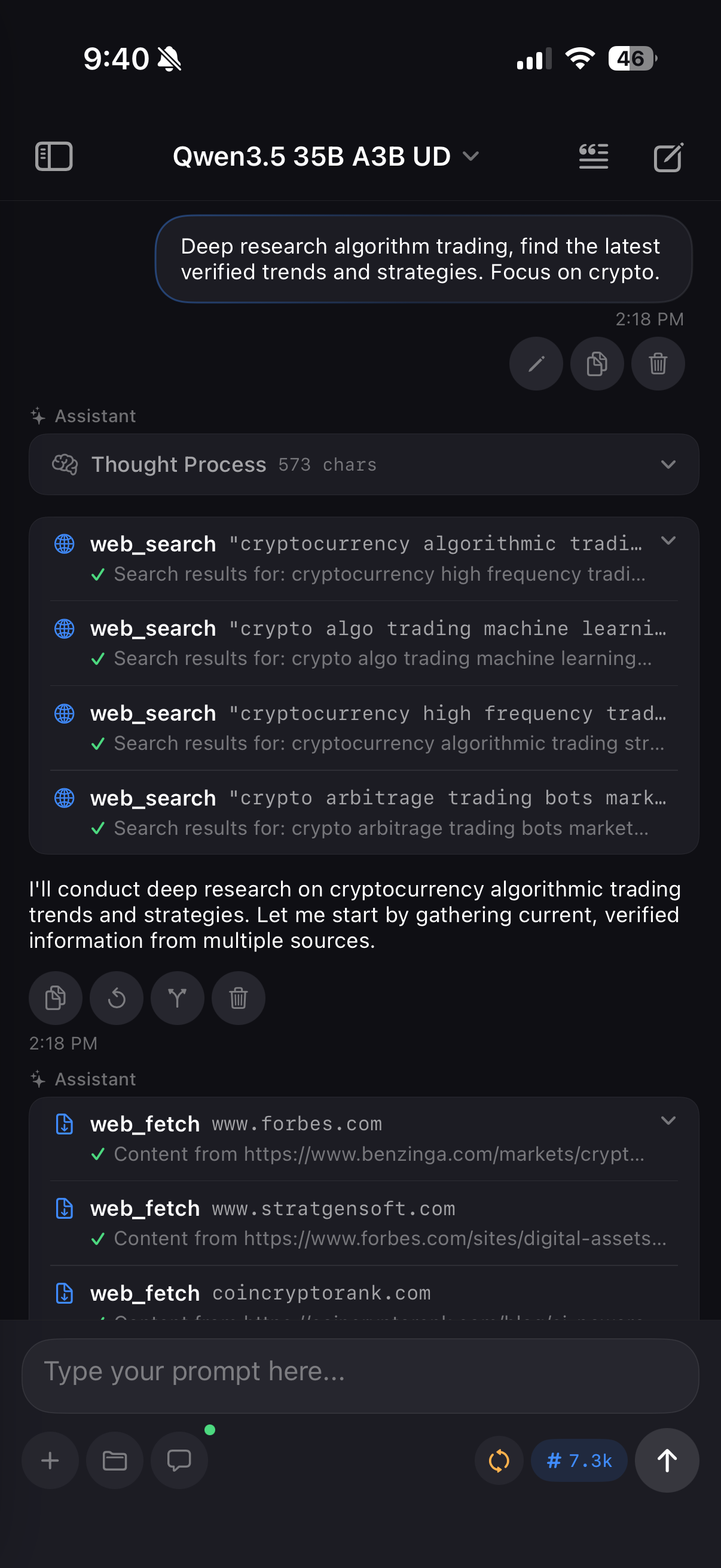
Agent mode with web search
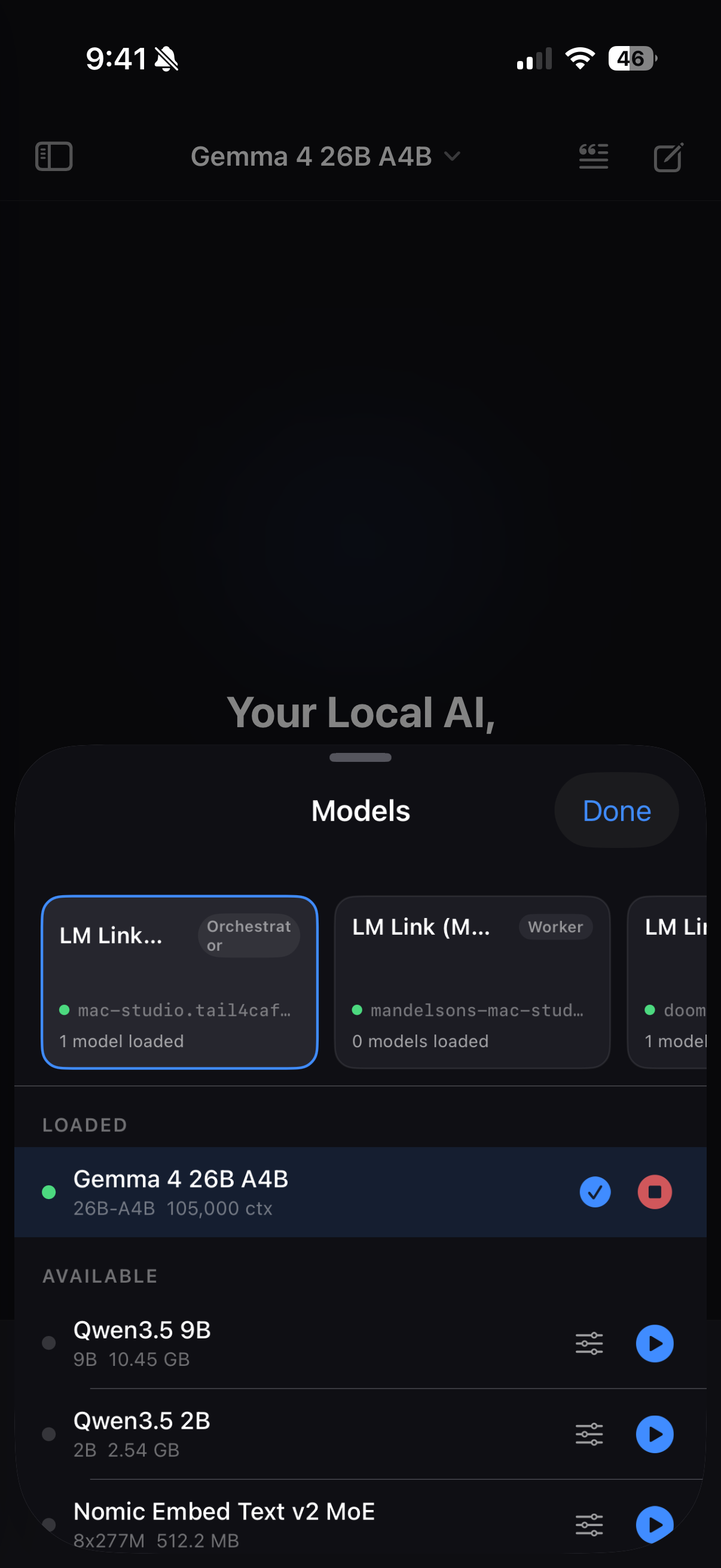
Multi-device model selector
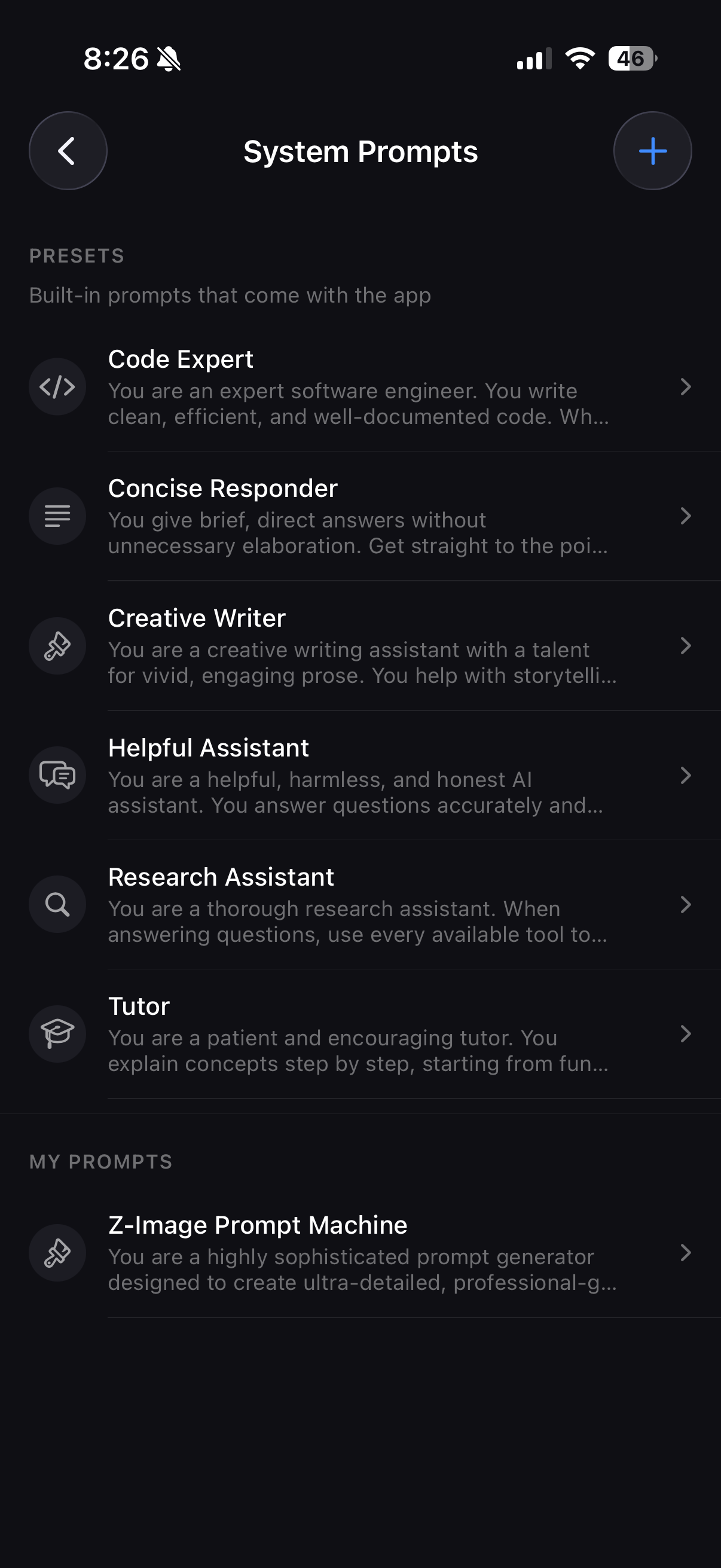
System prompt manager
Tool System
The agent and orchestrator modes are powered by a tool system built on function calling. Every tool implements a protocol with a name, description, JSON schema for parameters, and an async execute method. The model decides which tools to call based on the conversation context.
The tool roster includes workspace operations (file CRUD), web search via DuckDuckGo (no API key required), web fetching with readable text extraction, batch execution for spawning parallel sub-agents, clipboard access, device info, URL opening, and template generators for common patterns like component scaffolding and project planning.
The batch execute tool is particularly interesting. It lets a single model spawn two to three parallel sub-agents on the same connection, each working on a different subtask simultaneously. This is distinct from the multi-device orchestration — it's concurrency within a single node.
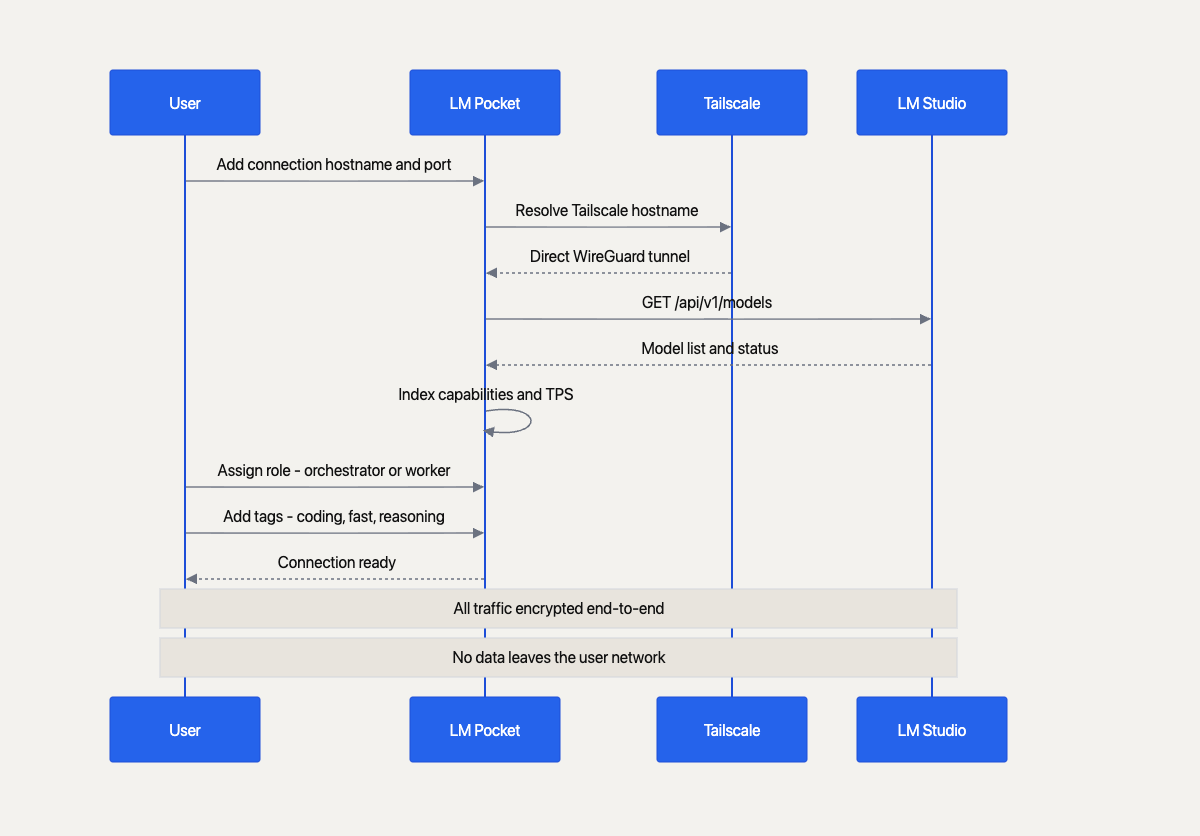
The connection setup flow. From adding a hostname through Tailscale tunnel establishment to model discovery and capability indexing.
Next Case Study
Backdraft AI →