
Same machine. Roughly 33% more tokens per second.
A couple weeks ago a Llama.cpp update landed that moved local inference enough that I noticed without measuring. Then I measured.
Before the update, my go-to model peaked around 57 to 65 tokens per second and decayed as context grew. Long sessions would drift into the mid-50s, which is right around the point where agent loops start to feel like watching a kettle.
After the update, the same model holds 80 to 90 tokens per second across the whole session, with the worst dip deep into context landing near 78. Even the bad moments are faster than every good moment on the old build.
That's the story. If you've bounced off local models because they felt sluggish during real work, it's worth trying again this week.
Agentic work compounds every token.
I'm not chatting with my local model. I'm running loops. Tool call, review, edit, retry, summarize. A single feature iteration might fire 30 messages across two models. At 57 tok/s and degrading, that kind of loop stalls. You feel every pause. You stop trusting the flow to finish, and you end up babysitting it.
At 80-plus sustained, the loop gets out of your way. The model didn't get smarter this month. The wait cost dropped far enough that I stopped opting out of agent workflows, which is a different kind of improvement.
The two speed tiers
The smaller the model, the bigger the payoff.
The 80-plus I mentioned is my big-model floor. On the small end, the same update pays off even harder. A 2B dense model on this machine now clears 160 tokens per second. That's fast enough that the reply lands the moment you stop typing.
Small models handle intake, classification, short replies, anything where the user is waiting on a fast answer. The MoE handles the work that actually needs reasoning. Here are two back-to-back measurements from the LM Studio status bar, same machine, same week.
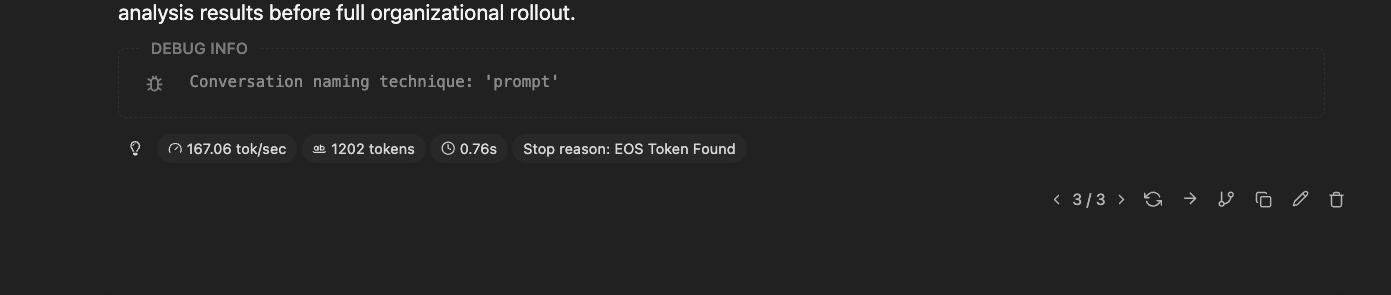
167 tok/s on a small dense model. Short, structured replies feel effectively instant at this speed.

84.84 tok/s on the MoE for a ~3,300-token answer. Long-form reasoning, still comfortably above the point where agent loops feel alive.
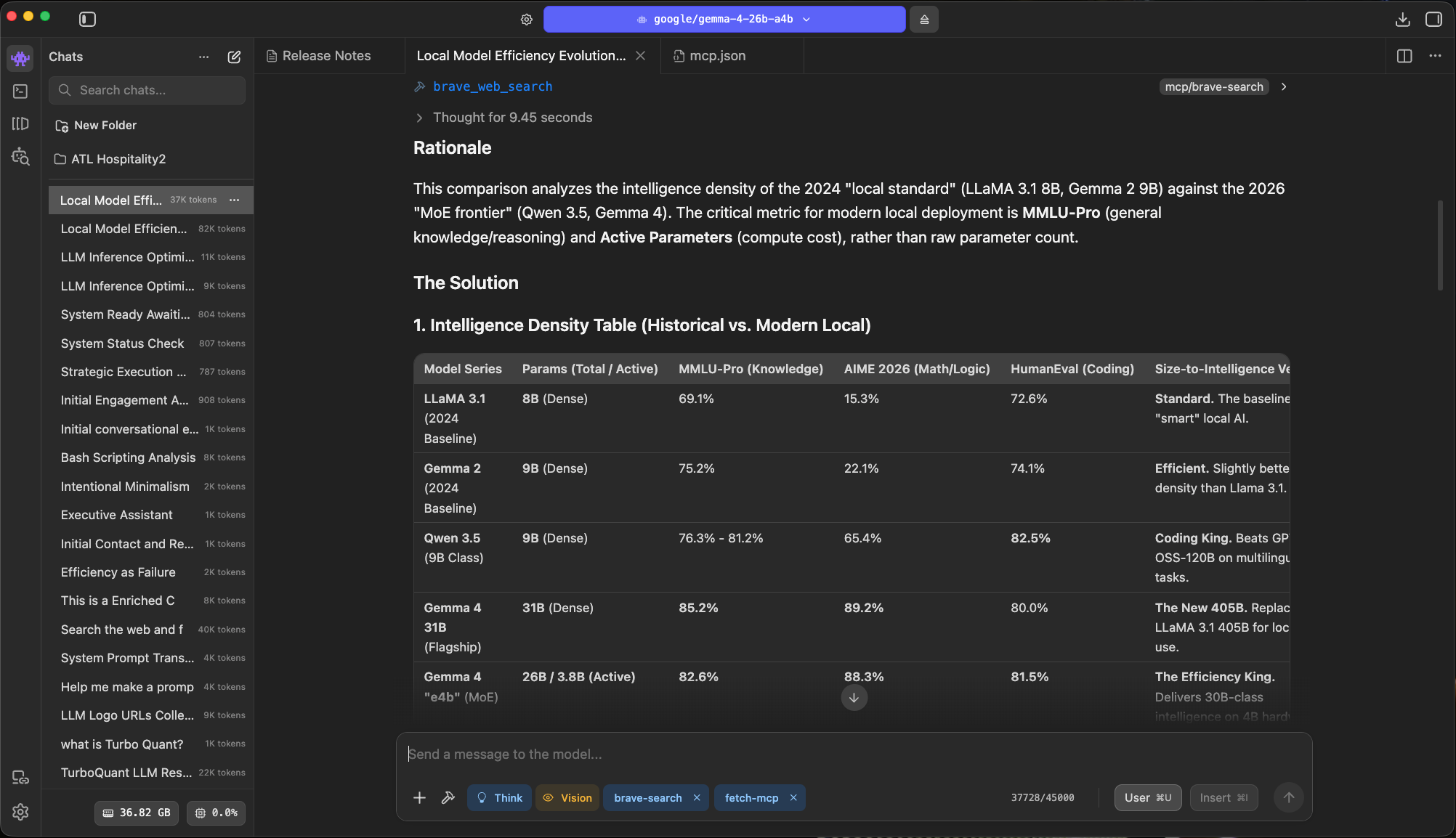
The shape of local has changed. Smaller footprints, better outputs, the kind of jump that's hard to see month to month but obvious when you line up the years.
What to run, by machine
Pick a model that matches the RAM you actually have.
Most of the advice online ignores this. The right model depends on your hardware, and trying to stretch past it is how you end up with 8 tok/s and swap thrash.
Modest hardware, the MacBook Air M-series tier with 16 to 24 GB of unified memory: run one small dense model. I'd pick from Qwen 3.5 4B, Gemma 4 4B, or Nemotron 5 Nano 4B. These are genuinely good for intake, classification, summarization, and short creative work. Coding is okay, not their strength.
Mid-range, 32 to 64 GB of RAM with a dedicated GPU or an M-series Pro or Max: step up to an 8B. Gemma 4 8B, Llama 3.6 8B, or Qwen 3.5 8B all feel noticeably stronger on reasoning and code while staying fast.
Serious workstation, 32 GB-plus unified memory on recent Apple silicon (M2 Max onward) or a high-VRAM GPU: this is where the interesting move is. Skip dense models and run an MoE, specifically Qwen 3.6 35B-A3B. 35 billion total parameters, only about 3 billion active per token. You pay the memory bill of a big model and the speed bill of a small one. Two things to know about the threshold. RAM decides what you can load, so 32 GB is enough to fit a 35B MoE. Chip generation decides how fast it runs, and once you're on M4-class silicon a 32 GB machine will leave a 64 GB older-generation box behind on throughput.
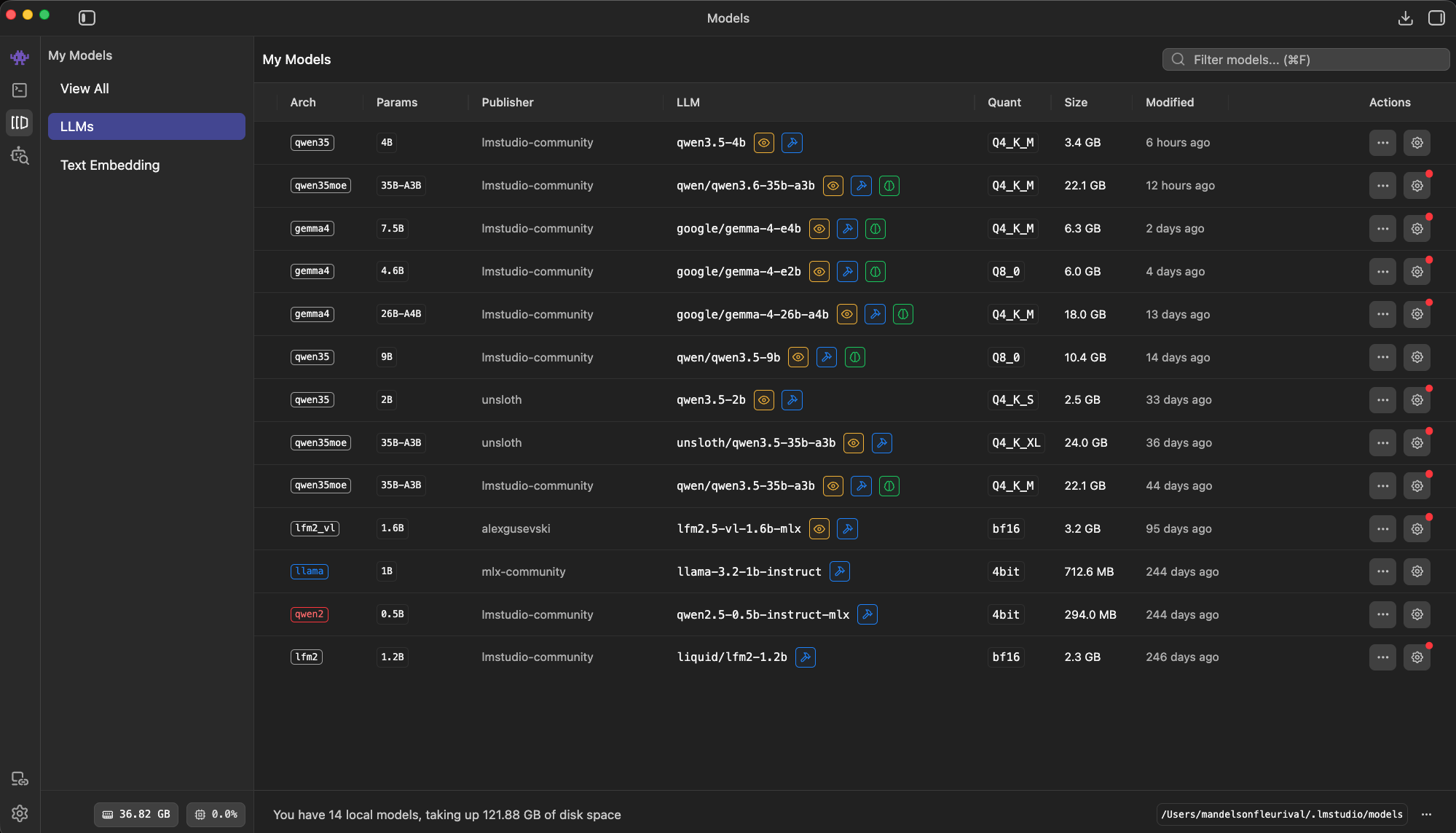
14 models, most of them quantized two or three different ways. I pin one daily driver per machine and treat the rest as task-specific.
LM Studio settings
Turn these on. Defaults leave speed on the table.
The Developer tab's Server Settings panel is the difference between a model that feels fast and one that doesn't. Here's what I actually toggle.
- Flash AttentionFree win
- Lower memory, faster attention. No quality tradeoff on Apple silicon or recent CUDA. Leave this on.
- mmapFree win
- Faster model load, lighter RAM pressure. Makes swapping between models bearable instead of a 30-second stall each time.
- Unified KV CacheMulti-model only
- Cleaner memory accounting when you're running more than one model. If you only load one, it doesn't change much.
- K/V Cache QuantizationTradeoff
- Trade a sliver of quality for real memory savings.
Q8is almost free and should be your default.Q4is a judgment call worth testing on your own prompts. - GPU OffloadSize to fit
- Push as many layers onto the GPU as your VRAM allows. Partial offload is fine. Don't try to fit everything if it means swapping to disk, which is far worse than CPU inference.
- Evaluation Batch SizeBump it
- The default is usually too conservative. Setting it to
2048moves prompt processing noticeably on most machines. - Context lengthRight-size
- Don't set it higher than you use.
32Khandles most work.65Kif you're running long agent sessions. Bigger windows cost memory even when they're empty.
These aren't magic. They're reasonable defaults for serious work, and LM Studio ships with them off or low for safety. Flip them.
Mixture of Experts
35B-class reasoning at 8B-class speed.
MoE is how you get a big model's breadth at a small model's speed. That's the sentence I kept trying to write for two years before a release earned it.
The intuition: a big model that only lights up the parts it needs for each token. For Qwen 3.6 35B-A3B, the math shakes out like this:
- 35 billion total parameters in memory
- ~3 billion active per token, so throughput feels like a dense 8B
- Reasoning quality closer to the 24 to 30B dense class
- 32 GB on M2 Max or newer is enough to load it
The Discover page pitch flags "stability and real-world utility" and "agentic coding," which is exactly the use case that used to send me back to a cloud API.
Loading and speed are different stories, though. More RAM fits bigger models. A newer chip decides how fast whatever you load actually runs. On the M3 Max I can't clear 45 tokens per second with the same kernel and the same model that hits 80-plus on the M4 Max. Same model, same kernel, nearly double the throughput on newer silicon.
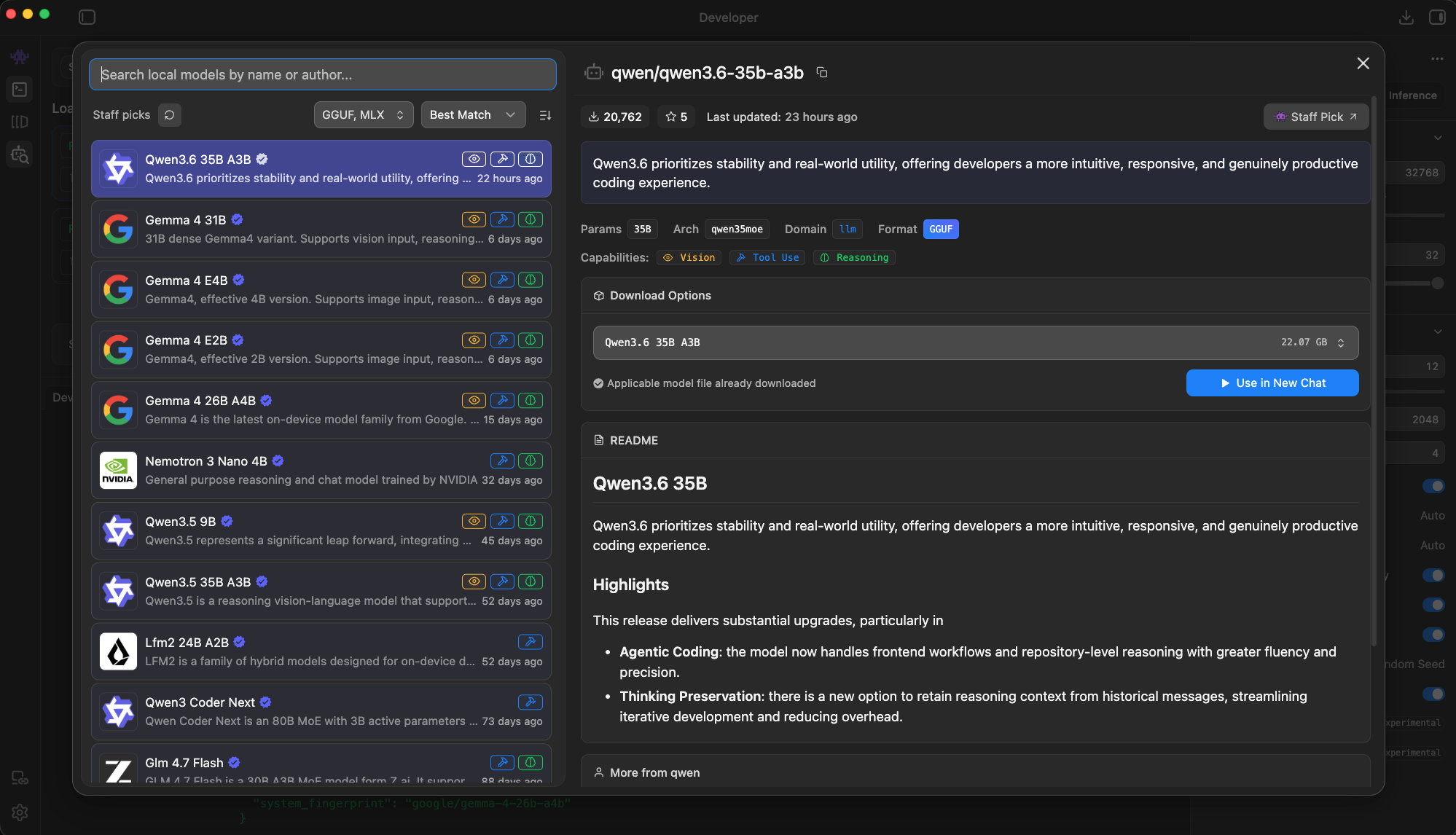
Staff Pick, and deservedly so. This is the model I'd download first on any workstation that can hold it.
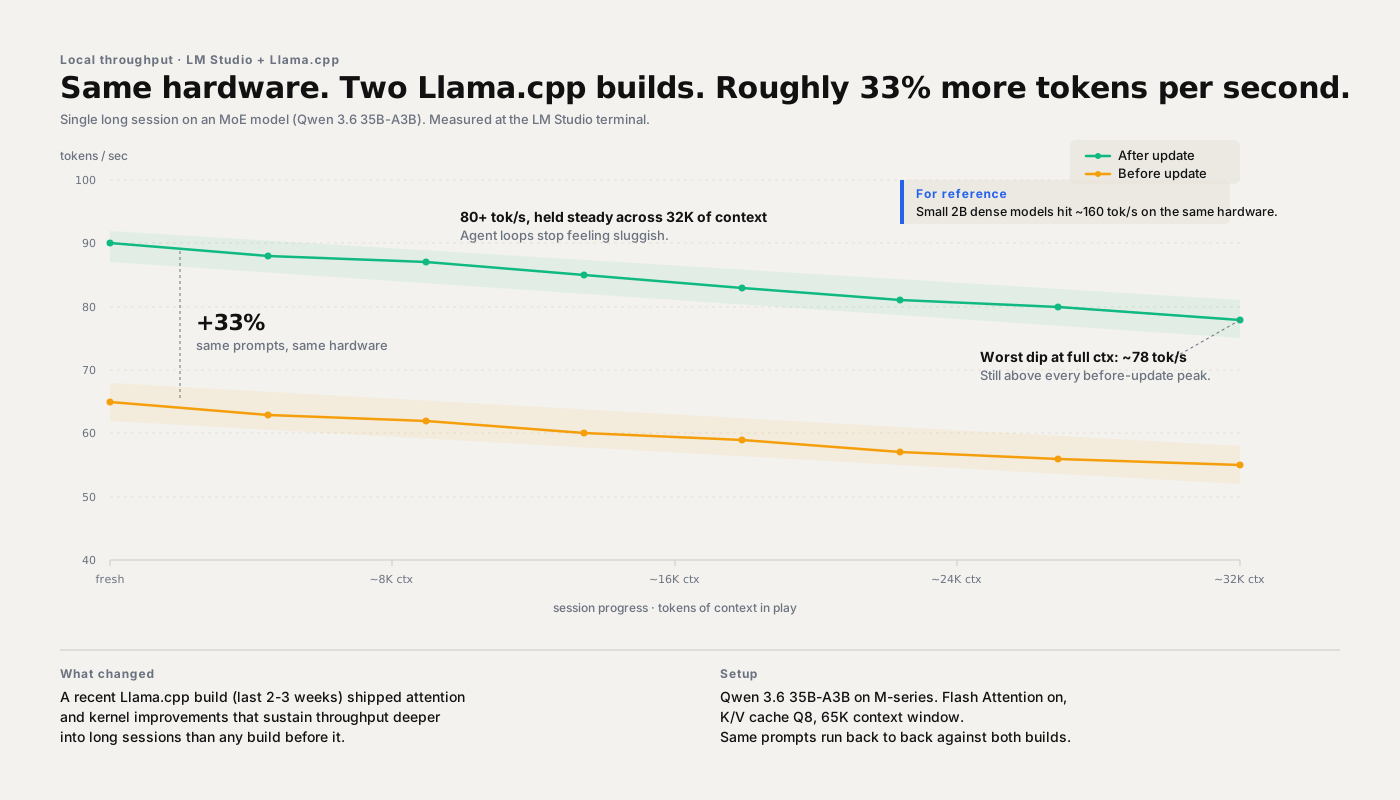
Same prompts, same machine, two Llama.cpp builds back to back. Both lines slope down as context grows (the KV cache doing its usual work), but the new build sustains a markedly higher floor.
Local is fast enough now to run the loops a cloud model can't afford.
The takeaway
Local crossed a line. Pick a model, turn the knobs, try it this week.
A year ago I'd have told you to keep the serious work on a frontier API and treat local as a nice offline backup. That answer changed two weeks ago.
If you've got modest hardware, a 4B gets you further than you'd expect. If you've got mid-range hardware, an 8B is a real daily driver. If you've got a workstation, Qwen 3.6 35B-A3B is the model to try first.
Then open the Developer tab, flip those settings, and run an agent loop. Not a single-turn chat. The whole thing. That's where the speed bump actually pays you back.
Share this post
Keep reading
More worth your time

Blog post · AI, Building, Process
The Context Window Is a Trap
We chased million-token context windows for years. The rot didn't get fixed. It just moved somewhere quieter.
Read post →
Blog post · AI, Thoughts, Building
The Cloud Is a Liability
Every time a regulated firm pastes sensitive data into a cloud chatbot, it isn't using AI. It's leaking.
Read post →Stay in the loop
New posts, same voice.
Get a short email when I publish something new. No weekly digests, no link dumps — just the essays.