
Multi-edit flows
Why a queued batch is where this class of bug hides.
Agents that can only edit one thing per turn aren't really agents. Real work means queuing multiple changes against the same file, applying them as a batch, and moving on.
Which is where the bug I'm about to describe lives. It never shows up with one edit. Sometimes shows up with two. With five edits queued against a single read_file snapshot, it's guaranteed. The model's output was correct every time. The problem was the contract I'd written around how those edits applied.
The setup
Read once, edit many.
Jarvis's big brain has a read_file tool that returns content with line numbers, and a replace_lines tool that takes start_line, end_line, and a replacement body. Normal flow: read the file once, queue several edits against that snapshot, apply them as a batch.
One edit works fine. Two edits usually work. Five edits against a real file is where it falls apart, and for a while I couldn't figure out why.
The failure mode
Line numbers shift the second you apply the first edit.
Say the model reads component.tsx and gets a 140-line snapshot back. The reviewer flagged three things: a function signature, a call site that depends on it, and some prop defaults further down. The big brain queues all three edits against the one snapshot before applying any of them.
What the model sends to the executor before any apply step runs. Every call references line numbers from the same read_file snapshot.
-
R read_file one-time snapshot
- path
- component.tsx
returned 140 lines returned with line numbers. -
1 replace_lines fix the function signature
- start_line
- 45
- end_line
- 48
- body
"export function UserCard({ id, ...rest })"(4 lines in, 6 lines out)
-
2 replace_lines update the call site that uses it
- start_line
- 82
- end_line
- 85
- body
"<UserCard id={user.id} />"
-
3 replace_lines refresh the prop defaults
- start_line
- 120
- end_line
- 123
- body
"const DEFAULTS = { variant: 'compact' }"
All three reference line numbers from that same read_file snapshot. None of them know about each other.
Apply call 1. The replacement is six lines instead of four, so the file is now 142 lines. Line 82 is now line 84. Line 120 is now line 122.
Call 2 fires next. It targets line 82, but that content isn't there anymore. Either you hit a content-mismatch error, or worse, you silently overwrite the wrong thing because the lines near 82 look close enough to the snapshot to pass validation. Call 3 falls the same way.
One bad edit turned the review cycle into a doom loop. Reviewer flags three issues. Big brain queues three fixes. Two land in the wrong place. Reviewer sees new issues (because the file is now half-broken), loops again. Work that should take one pass was taking four.
The order you apply changes in matters as much as what the changes are.
What I tried first
The wrong fixes.
Re-read the file before every edit. Works. Also burns tokens on a redundant snapshot for every single tool call, which piles up fast on large files.
Make edits atomic, one per tool call, agent decides when to batch. Works. Also slows down any legitimate multi-fix refactor and adds round-trip latency.
Switch to diff-style patches. Works on paper. Harder to prompt for correctly, especially when the model is reasoning about what to change rather than literally writing a diff.
All three are real answers. They just all have tradeoffs I didn't love for a flow that wanted to be fast.
The fix
Sort edits by start_line descending, apply bottom-up.
An edit at line 120 only shifts lines below line 120. Everything above is untouched. Apply that edit first, and the snapshot stays valid for every remaining edit that targets earlier lines.
Same three calls as before. Same snapshot. Different apply order.
Reordered at apply time by descending start_line. The model can queue edits in any order it likes. The executor sorts them before running.
-
1 replace_lines bottom edit first applied
- start_line
- 120
- end_line
- 123
- body
"const DEFAULTS = { variant: 'compact' }"
returned Lines 1–119 unchanged. Targets above still valid. -
2 replace_lines middle edit, snapshot still accurate applied
- start_line
- 82
- end_line
- 85
- body
"<UserCard id={user.id} />"
returned Target content matches snapshot exactly. -
3 replace_lines top edit, nothing below ever touched it applied
- start_line
- 45
- end_line
- 48
- body
"export function UserCard({ id, ...rest })"
returned Target content matches snapshot exactly.
No re-reads. No atomic calls. No diff format. Just a sort on the edit queue before apply.
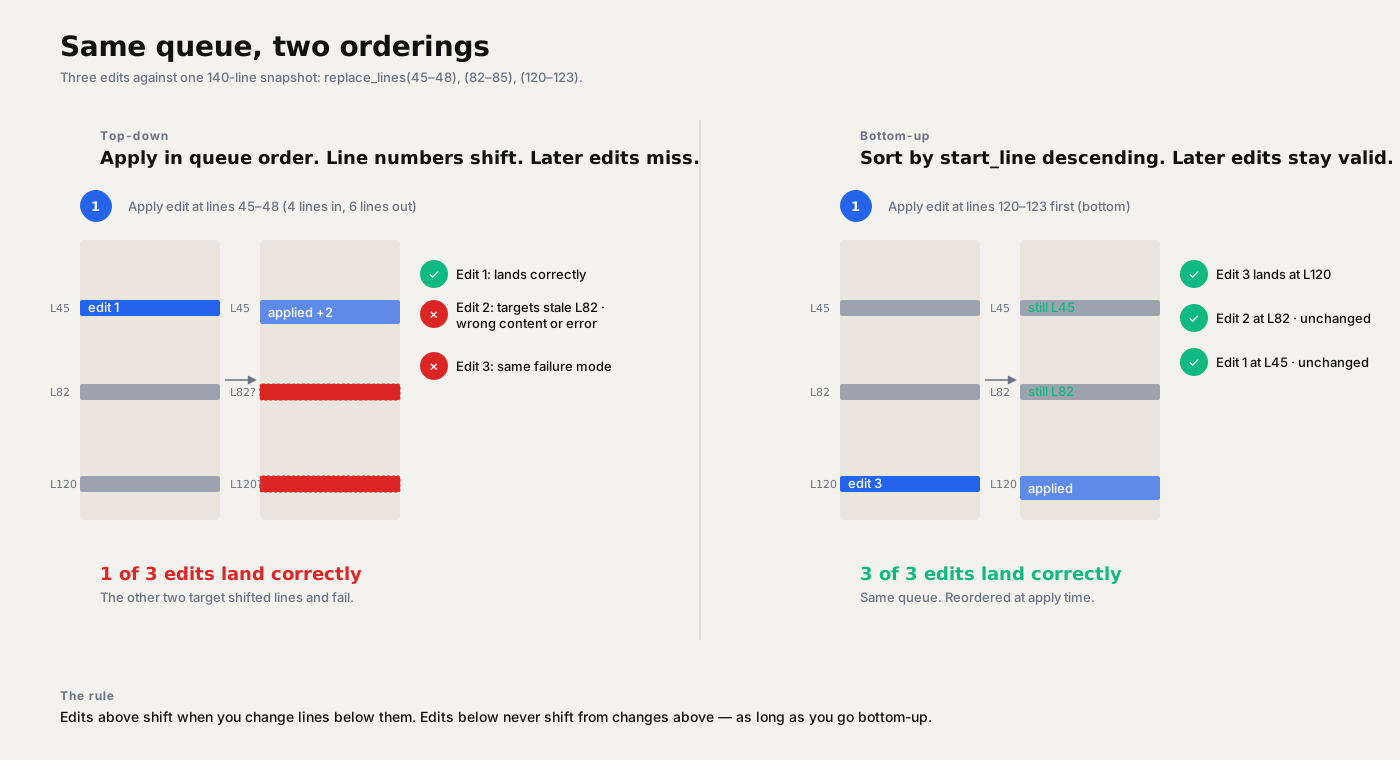
Same three edits. Top-down lands 1 of 3 correctly. Bottom-up lands 3 of 3.
QA
The test that caught it.
The original symptom wasn't obvious. The TUI was logging edit applied events that looked fine. I only caught it when I diffed the output against what I expected and saw edits landing in the wrong places.
I wrote a fixture. A 150-line file and a queue of five edits at spaced-out line ranges. Ran it top-down, diffed the output, counted hits.
- Top-down: 2 of 5 edits landed correctly. The other three either errored or overwrote nearby lines.
- Bottom-up: 5 of 5 landed, every run.
This is the kind of test that doesn't come out of reading the code. You have to put the system through a realistic load and look at what it actually produced, not what it logged.
Belt and suspenders
A guaranteed sort, plus a prompt rule behind it.
Two mechanisms, not one. The executor sorts every replace_lines queue by start_line descending before applying any edit, regardless of what order the model sent them in. That sort is the guarantee. The model can queue edits in any sequence and still end up with a valid result.
The prompt carries the other half. Added to the big brain's system prompt at jarvis/llm/prompts.py:30: when multiple edits queue against one snapshot, sort descending and apply bottom-up. That keeps the model's reasoning aligned with what the executor is going to do anyway, so the chain stays clean.
The sort makes the outcome deterministic. The rule keeps the model on the right path to that outcome. Single-edit cases are unaffected. Multi-edit review cycles now land every change on the first try.
The takeaway
Most LLM tool-call bugs look like prompt bugs until you look closer.
I spent an hour blaming the model for sloppy edits before I tested the assumption that any edit order would work. The model was fine. The tool contract I gave it wasn't.
When a tool call is technically correct but the outcome is wrong, look at the side effects of other calls in the same batch. Check if one call is changing state that a later call assumes. That's where the bug usually lives, and it won't show up in any single call's logs.
Share this post
Keep reading
More worth your time

Blog post · AI, Building, Process
The Context Window Is a Trap
We chased million-token context windows for years. The rot didn't get fixed. It just moved somewhere quieter.
Read post →
Blog post · AI, Building, Process
Catching the 7,000-character write
When your local model's tool call drops a required parameter and a long file almost gets thrown away.
Read post →Stay in the loop
New posts, same voice.
Get a short email when I publish something new. No weekly digests, no link dumps — just the essays.